
Choose between Stripe or PayPal to connect to Paperbell for payment processing: you’ll need a PayPal or Stripe account in order to sell packages in Paperbell.
We recommend using Stripe if possible, as its fees tend to be lower and it works with all of Paperbell’s payment options. You can create an account via your payment settings page if you don’t already have one.
PayPal
With PayPal, you’ll only be able to process one-time payments for your packages (not subscriptions or payment plans).
Your clients do not have to have a PayPal account in order to pay you via PayPal. They can log in with their PayPal account, or they can just use their credit card if they don’t have a PayPal account or don’t want to use it.
How to Connect PayPal
Head to your Payment Integration page, and select PayPal from the menu.
You’ll enter the email address you use to access that Stripe account, and that’s it!
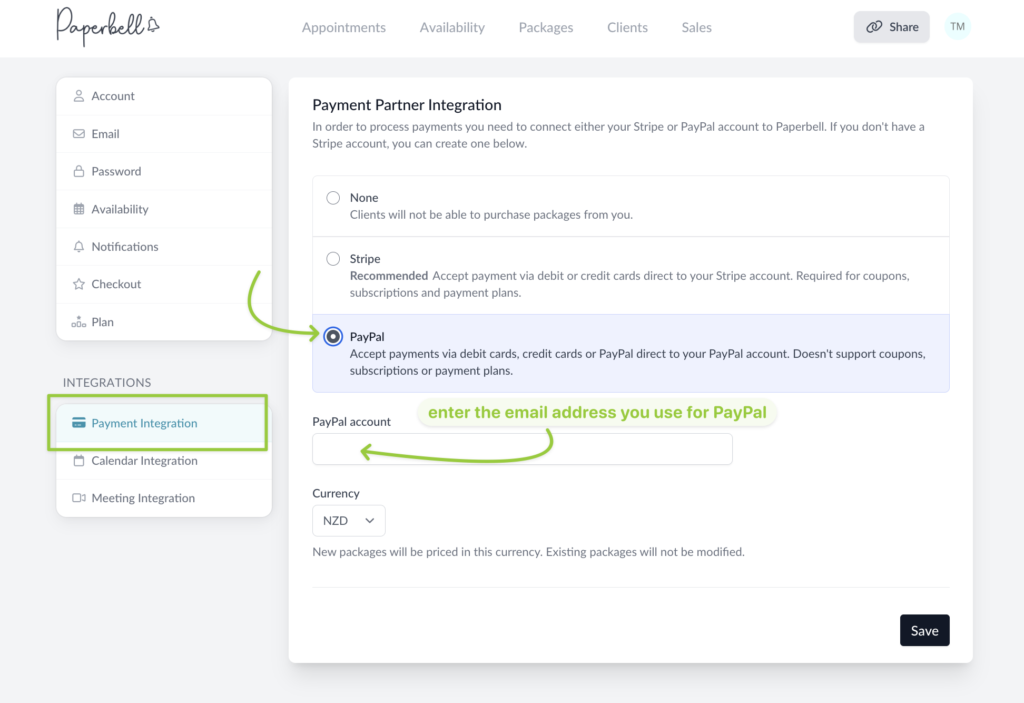
If you need to create a PayPal account, get started here. Reach out to PayPal Support and access resources here.
Stripe
Stripe is our recommended payment provider. With Stripe you have full package pricing options, including payment plans and subscriptions.
Stripe is a payment gateway that takes all major credit cards. So when you use Stripe, it functions like a typical credit card checkout to your clients. It will not ask them for any kind of Stripe login.
How to Connect Stripe
Go to your Payment Processor Settings page, and choose Stripe from the options.
Click the button that reads “Connect or create a Stripe account”
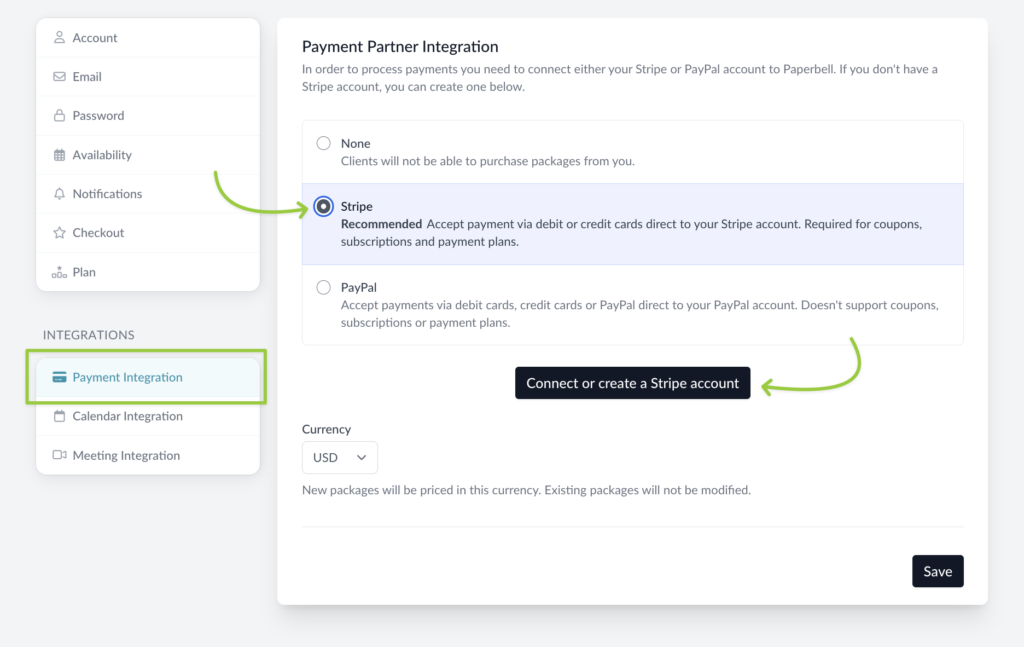
If you have a Stripe Connect account already, log in to your account and you’ll be all set.
If you don’t have an account yet, you’ll be walked through the process of creating and setting up the account when you click the button.
Learn more about using Stripe as your payment processor here, and find Stripe’s support resources here.
FAQs
Can I let my clients choose between using PayPal or Stripe?
No, you’ll connect either Stripe or PayPal to process payments made for your Paperbell packages.
Stripe is not available in my country, what do I do?
If Stripe isn’t available where you live, you’ll need to use PayPal. Unfortunately this does mean that subscriptions and payment plans won’t be available in your account.
What credit cards does Paperbell accept?
Both Stripe and PayPal accept all major credit cards. This means your customers in Paperbell will be able to pay using whatever methods are accepted by your payment provider.
Can I accept payment via Venmo, Zelle, Opayo, checks, or other payment methods?
Not within Paperbell. To process payments for packages inside Paperbell, you’ll need to connect a PayPal or Stripe account.
If you want to offer these payment options while still using Paperbell for everything else, we’ve got tips on how to set things up here.
What are the fees for using PayPal or Stripe?
Paperbell does not take a percentage of your sales. PayPal and Stripe each take a percentage, based on location and currency.
For the US:
- Stripe is 2.9% + 30¢ per successful card charge (recurring subscription charges carry an additional .5% fee from Stripe)
- PayPal is 3.49% + fixed fee (which varies by currency – USD is 49¢)
More information about Stripe’s fees can be found here. And you can check out PayPal’s fee information here.
Check our list of currency options here, and learn how to offer packages in multiple currencies here.