
Every Paperbell site has its own Paperbell URL. You can use that URL as-is, or set your own domain or website to send visitors to Paperbell.
Your Paperbell site’s home address
Your Paperbell site URL is automatically created as https://paperbell.me/[your-name]
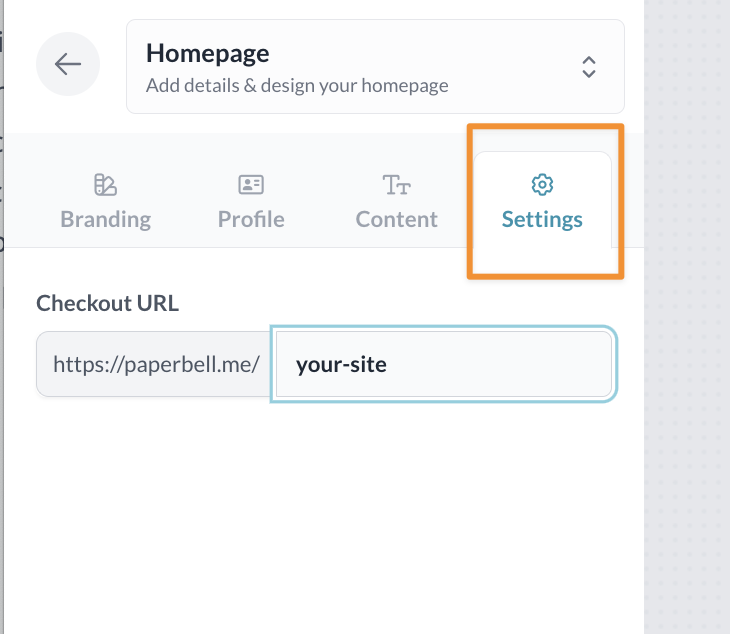
You can change that [your-name] part to whatever you like (as long as no one else has it already).
Edit your site URL in your Homepage Settings:
Forward or redirect your domain to your Paperbell URL
If you own a domain, you can set it up to automatically forward visitors to your Paperbell site.
For example: CoachLisa.com → paperbell.me/coachlisa
When someone visits CoachLisa.com, they’ll be redirected to your Paperbell site. Once they arrive, they’ll see your paperbell.me URL in their browser’s address bar.
You’ll set this up with the company that manages your domain. Here are instructions for some common providers:
If your provider isn’t listed, search their help center for domain forwarding, forward domain, or domain redirect.
Redirect a specific page to your Paperbell site
Maybe you want to keep your existing website at CoachLisa.com, but you’d like:
CoachLisa.com/coaching/
to send visitors to your Paperbell site or a specific Paperbell page.
You’ll need to create a URL redirect from that page to the Paperbell URL you want visitors to reach.
If you use WordPress, we like the Redirection plugin. Here are instructions for Wix and Squarespace.
What about masking or cloaking?
Some domain providers offer masking (sometimes called cloaking or URL framing).
With masking, someone can visit your domain and see your Paperbell site while your domain stays visible in their browser’s address bar.
We don’t recommend masking. Masked domains can cause display problems, particularly on mobile devices, and may behave unexpectedly when links are shared on social media.
If you still want to use masking, you’ll need to check whether your domain provider supports it. Here are instructions from GoDaddy, HostGator, and Namecheap.
Some providers, including Squarespace, don’t offer domain masking.
Want to use your own domain as your Paperbell site’s address?
Forwarding sends visitors from your domain to a Paperbell URL.
If you’d rather have your own domain stay in the address bar while visitors browse your Paperbell site, you’ll want to connect a custom domain instead.
→ [Learn how to connect a custom domain to your Paperbell site]