

You just finished a session and it went really well. Your client had a breakthrough. Something shifted. You know you want to remember exactly what happened: what they said, what you noticed, the action items they committed to.
But your next session starts in five minutes.
Which means you only have a limited amount of time to get everything down while at the same time, preparing for your next call.
A good coaching log keeps all of that info for you. It’s the difference between “I think we covered goals last session?” and walking into every session knowing exactly where things left off.
The good news? You don’t need to build one from scratch. Grab the free template below, make a copy, and start using it today.
Free Coaching Log Template (2026)
A Google Doc you can copy and fill in for every client session. Covers client info, session notes, action items, progress tracking, and coach’s own reflection space.
Get the free template → Download as PDF
This button allows you to copy our Google Docs template
What’s Inside the Template (Preview)
Here’s what the coaching log template covers. You can see the full structure before you click:
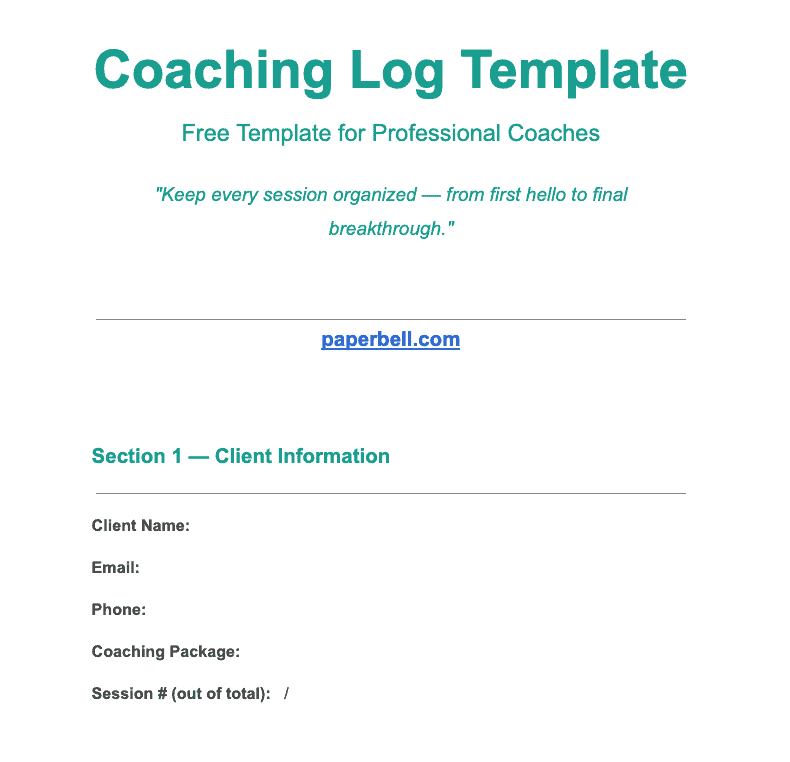
The template has 12 sections across two pages:
- Client Information: name, email, package, session number
- Session Details: date, duration, format (video, phone, in-person)
- Pre-Session Intentions: what the client wants to accomplish today, plus any carryovers
- Session Notes: What the Client Said: key themes, direct quotes, main points
- Session Notes: Coach’s Observations: patterns, emotions, what went unsaid
- Key Insights & Breakthroughs: what shifted, what the client realized
- Action Items: specific steps with deadlines and a completion checkbox
- Progress on Previous Commitments: review what they said they’d do last time
- Follow-Up Needed: resources to send, worksheets to prepare
- Next Session Prep: date, client’s focus, your prep notes
- Coach’s Post-Session Reflection (private): what went well, what you’d change, patterns you’re seeing
- ICF Hours (optional): session type and hours for certification tracking
Each section has fillable prompts so you’re never staring at a blank page. Make one copy per client, or one copy per session, whatever works for how you run your practice.
What Is a Coaching Log?
A coaching log is a written record of your coaching sessions. It captures what happened, what was decided, and what comes next, for each client, after each session.
Think of it as your memory for your practice. Without it, details blur together. With it, you walk into every session knowing exactly where things stand.
A coaching log is different from session notes in one key way: session notes capture what happened in a single conversation. A coaching log is the running record across multiple sessions with a client. It tracks progress over time, not just one moment.
(More on that distinction in the FAQs below.)
Coaches keep logs for different reasons: staying organized, tracking ICF hours, spotting patterns across months, and not having to reconstruct what happened last session from memory. If you’re managing more than two or three clients, a log stops being optional and starts being how your practice runs.
Why Coaches Keep a Coaching Log
1. You’re Fully Prepared for Every Session
Before a session, you can scan last week’s notes in two minutes. What did they commit to? Did they follow through? Where did they leave off emotionally? You don’t have to rely on memory. It’s all there.
2. Your Clients Feel Genuinely Seen
When you reference something specific from three sessions ago (“you mentioned you’d been avoiding that conversation with your sister”), your client knows you were actually listening. That kind of attention builds trust fast.
It also signals professionalism. Clients who feel genuinely tracked are more likely to take the work seriously, show up on time, and follow through on what they commit to.
3. You Can Spot Patterns Over Time
One session alone won’t show you that a client consistently avoids action on anything related to money, or that they light up every time they talk about leading a team. A log across 10 sessions makes those patterns visible. That’s often where the real coaching work is.
4. Accountability Has a Paper Trail
When action items are written down and reviewed at the start of every session, clients take them more seriously. And so do you. “You said you’d send that email by Tuesday” lands differently when you have the date right in front of you.
5. Your Certification Requirements Are Covered
If you’re working toward ICF certification, you need documented proof of client coaching hours. A well-kept log is that proof. The template above includes an optional ICF hours section specifically for this.
6. You Have a Written Reference When You Need It
Clients sometimes return after a break. Referrals mention something a former client said. You’re asked to write a coaching summary. When any of that happens, your log is the source you reach for.
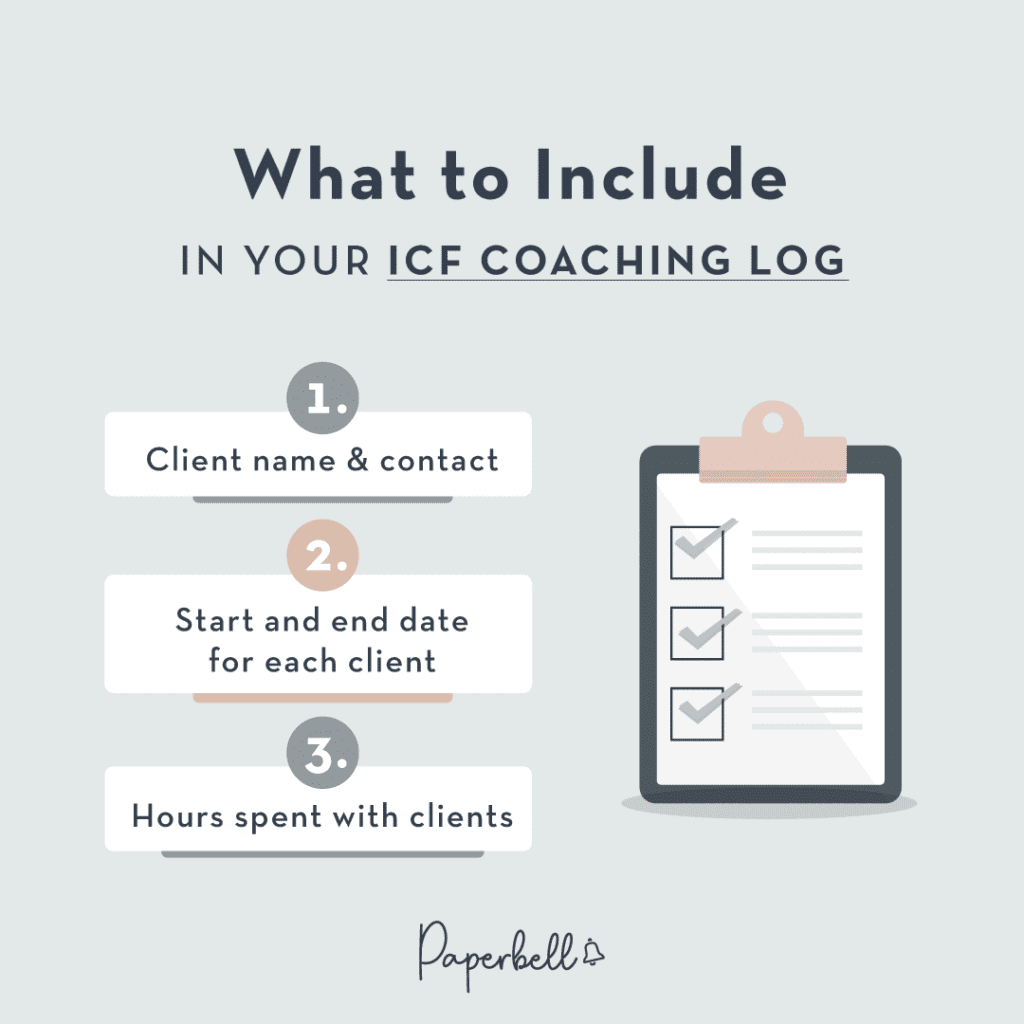
What to Include in Your Coaching Log
The most useful coaching logs cover these fields. You don’t need all of them in every session, but having a template with all of them means nothing important gets skipped:
- Client name and contact details
- Session date, time, and duration
- Session number (session 4 of 12, for example)
- Pre-session goals: what the client wanted to focus on today
- Session notes: what the client said AND what you observed as the coach
- Key insights or breakthroughs: moments where something shifted
- Action items with deadlines: specific, not vague (“send the email by Friday,” not “work on communication”)
- Progress review: did they complete what they committed to last time?
- Follow-up items: resources to send, things to research before next session
- Coach’s reflection: your own private notes on how the session went
That last one is easy to skip, but it’s worth keeping. Patterns in your coaching style show up in your own reflection notes long before they’d show up anywhere else. If you notice you’re consistently redirecting a client away from a hard topic, that’s something you want to catch.
One more tip: keep the “what the client said” notes separate from “what I observed as a coach.” They’re different things. Direct quotes and client-stated themes are different from your interpretation of those themes. Mixing them makes it harder to go back and revisit your own read on a situation without contaminating the source material.
Coaching Session Notes Template
Sometimes you just need the session notes portion: a quick-capture format you fill in during or right after a session, before your next client. Here’s the minimal version:
CLIENT: _______________________     DATE: _______________
SESSION #: ______

TODAY'S FOCUS: ________________________________________________

WHAT THE CLIENT SAID:
_______________________________________________________________
_______________________________________________________________

WHAT I NOTICED (as coach):
_______________________________________________________________

KEY INSIGHT OR BREAKTHROUGH:
_______________________________________________________________

ACTION ITEMS:
1. _________________________________ by ___________
2. _________________________________ by ___________
3. _________________________________ by ___________

FOLLOW-UP: ___________________________________________________
NEXT SESSION: ________________________________________________
This stripped-down version works well if you’re new to logging, or if you want something fast you can fill out in the five minutes between sessions. Print it, keep a stack by your desk, and fill it in by hand if that’s easier than opening a laptop.
The full 12-section template in the download above is better for coaches who want a complete client history across an entire engagement. Both are valid. Start where you’ll actually follow through.
Coaching Log Template: Google Sheets and Excel Formats
The downloadable template above is a Google Doc: one file per client, or one file per session. This works well when you want to keep detailed notes for each engagement.
But some coaches prefer a spreadsheet setup, especially if they’re managing a larger roster and want a bird’s-eye view across all clients.
A Google Sheets or Excel coaching log typically works best with this structure:
- Tab 1 — Session Index: Client name, date, session number, quick status. One row per session. Sortable, filterable.
- Tab 2 — Session Notes: The detailed notes for each session. You can duplicate this tab for each client.
- Tab 3 — Action Items Tracker: All outstanding commitments across all clients, with completion checkboxes.
- Tab 4 — Progress Over Time: Optional. Track milestones, goals hit, and themes per client over weeks or months.
The Google Sheets format is particularly useful for coaches who do group coaching or manage employee coaching programs, where you’re tracking progress across many people at once.
That said, most coaches who try a spreadsheet approach end up going back to a document format for the actual session notes. Spreadsheet cells get cramped fast when you’re writing paragraphs. The hybrid approach works well: use a spreadsheet for the tracker and index, use a Google Doc for the detailed notes.
If Excel is what you already have open all day, use it. The format matters less than the habit. A log you actually use in Excel beats a beautiful Google Doc template you never open.

How to Track Coaching Logs Using Paperbell
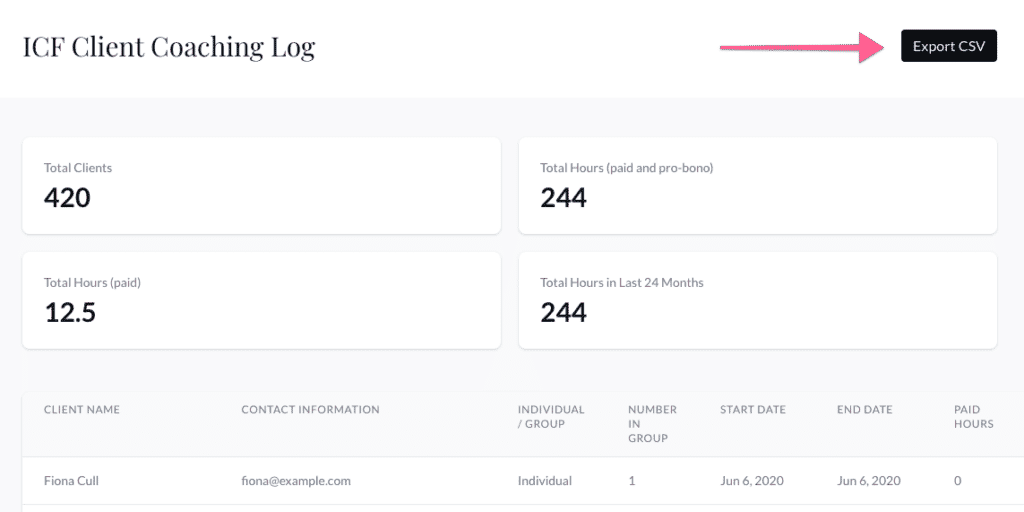
If you’re using Paperbell to manage your coaching practice, session notes are built right in.
After each session, you can log notes directly in your client’s profile. Notes are attached to the specific session, so your history builds up automatically without any extra filing. Your client’s action items, package details, and scheduling all live in the same place. You’re not jumping between a doc, a calendar, and a spreadsheet to piece together the full picture.
For coaches managing multiple clients, this makes the “before session” prep much faster. One click to pull up a client, and you’re looking at everything: previous notes, upcoming sessions, any forms they’ve completed.
Want to keep all of this in one place?
Paperbell keeps your coaching logs, scheduling, payments, and client portal together. No juggling multiple tools.
How to Use the Coaching Log Template
Here’s the practical workflow once you’ve downloaded the template:
Before the session (2 minutes)
Open the log from your last session with this client. Scan the action items and the “progress review” section. Note anything you want to follow up on. That’s your session prep done.
If you’re starting fresh with a new client, fill in Section 1 (client info) and Section 3 (pre-session intentions) based on any intake form or intro call notes you already have. That way the first session log is already half-written before they even show up.
During the session
Keep the template open. Jot notes in real time, or immediately after, while it’s fresh. Don’t aim for perfect prose. Aim for enough detail that future-you can reconstruct what happened.
A lot of coaches find that typing notes during a session feels awkward or rude. If that’s you, keep a notepad for keywords and phrases, then expand into the template in the five minutes after the call ends.
Right after the session (5-10 minutes)
Fill in the insights section while it’s still clear. Write down the action items your client committed to, with specific deadlines. Add your coach reflection notes. This is your private space, not something you share with clients.
At the start of the next session
Review the previous log. Pull up the action items. Check what they completed. This takes two minutes and makes the opening of every session much more grounded.
The whole system only works if you actually fill it in after every session. The barrier has to be low. That’s why the template is designed to be fast: the fillable prompts guide you instead of making you start from a blank page.
Common Coaching Log Mistakes (and How to Avoid Them)
Logging too late
If you wait until the end of your day to write up session notes, you’ve already lost half of what was said. The exact phrase your client used, the moment where something clicked: those details fade fast. Five minutes right after the session beats thirty minutes that evening.
Action items that are too vague
“Work on communication” is not an action item. “Draft a message to your manager and send it by Thursday” is. Vague action items don’t get done, and they’re impossible to review meaningfully at the next session. When you’re writing action items, ask: “Is this specific enough that we’d both agree on whether it happened?”
Not reviewing logs before sessions
The log is only useful if you actually read it before the next session. Build it into your prep routine: open the log, scan the previous notes, check the action items. Two minutes. If you’re not doing this step, you might as well not be logging at all.
Using a format that’s too complex to maintain
If your template takes 20 minutes to fill out, you’ll stop using it within a month. The template in this post is designed to be fast. If even that feels like too much, start with just the minimal session notes version above. Consistency beats comprehensiveness every time.
Keeping one big document for all clients
Searching a 40-page document to find what you said to a specific client on a specific date is a nightmare. One file or log per client makes this much easier. If you’re using a spreadsheet approach, one tab per client in the action items tracker works well.
Skipping the coach’s reflection section
This is the section most coaches drop first, and it’s a shame. Your post-session reflections are where you notice “I keep steering this client away from that topic” or “this client tends to commit to things they don’t actually believe in.” Those insights make you a better coach. They’re also private, so there’s no reason to skip them.

Frequently Asked Questions About Coaching Logs
What’s the difference between a coaching log and coaching session notes?
Session notes capture what happened in a single conversation. A coaching log is the running record across all sessions with a client. It includes session notes plus progress tracking, action items, breakthroughs over time, and the coach’s own reflections. Think of session notes as individual chapters; the coaching log is the whole book for that client relationship.
What format should I use for a coaching log: Word, Excel, or Google Docs?
Google Docs works well for detailed session notes because you have plenty of room to write. Google Sheets or Excel is better if you want to track progress across many clients at once, like a session index or action items tracker. Most coaches use a hybrid: spreadsheet for the overview, Google Doc for the detailed notes. The free template above is a Google Doc you can copy and adapt.
How do I use a coaching log to track ICF hours?
The template includes an optional ICF section where you log the session type (individual or group) and the hours. For full ICF certification logging requirements, see the Paperbell ICF coaching log guide. It covers exactly what the certification body wants to see documented and how to organize your records for a credential review.
Do I need to share my coaching log with clients?
That’s up to you and what you’ve agreed with your client. Some coaches share a summary of action items and key insights after each session. It reinforces accountability and shows your client you were paying close attention. Other coaches keep logs entirely private. The template above has a separate “Coach’s Post-Session Reflection” section meant to stay private; the rest can be shared if you choose.
How long should I keep coaching logs?
Most professional coaching ethics guidelines recommend keeping client records for at least a few years after the coaching relationship ends, in case of disputes or if the client returns. If you’re working toward ICF certification, you’ll need to retain records that document your coaching hours. Check with your certification body for specific requirements, as they vary by credential level.
Can I use a coaching log for group coaching sessions?
Yes, with a few tweaks. For group coaching, you’ll want a shared log for the group (themes discussed, group decisions, collective action items) plus individual notes for each participant where relevant. The template above can be adapted for this: use the “Client Information” section to note the group name and members, and use the session notes sections as normal. A spreadsheet format often works better for group coaching than a doc format, since you’re tracking multiple people at once.
What’s the best way to get started if I’ve never kept a coaching log before?
Start with the minimal session notes template in this post: just the quick-capture version with the fields you actually need. Fill it out after your next session. Don’t try to backfill old sessions; start from where you are. Once logging feels like a habit (usually after 2-3 weeks), you can switch to the full 12-section template if you want more depth.
Keep Your Coaching Practice Organized
A good coaching log won’t make you a better coach on its own. But it means you show up prepared, catch patterns you’d otherwise miss, and give clients the experience of being actually remembered. That part matters more than coaches expect.
The template above covers everything you need. Grab it, make a copy, and use it for your next session.
Free Coaching Log Template (2026)
Google Doc format. 12 sections. Fillable prompts. No email required.
Get the free template → Download as PDF
This button allows you to copy our Google Docs template
And if you want your session notes, scheduling, payments, and client portal all in one place: try Paperbell for free.