Watch the video below for an overview of creating and using contracts in Paperbell.
Here’s a contract template you can copy and edit to create your own Paperbell-friendly contract. ✍️
Contracts are associated with packages. To create one, go to your packages page and click on or create a package. Click on the Contract tab.

Click the Upload contract button in order to upload your PDF contract.
Can I see an example signed contract?
Yes! Here’s an example contract.You can see the audit trail feature which shows the exact details of the contract signing.
Our system adds the contract signing page to the end automatically, so you don’t need to insert a place for client signature. However, you should include your own signature if you would like it on the contract as you will not be signing, only your client.
Can I customize certain fields in my contract?
No. You cannot customize any fields to be filled out within the contract.
Your contract applies to everyone who buys the package, so the contract should describe the name, pricing, etc of the one package. (Or you can skip these details and just put in the general terms of working with you.)
When in the checkout process does a client sign their contract?
From your client’s perspective, the flow works like this:
1. Scheduling (if there are appointments to be booked)
2. Contract Signing (if a contract is part of the package)
3. Payment (if there is a payment to be made)
This ensures that clients cannot complete the process (payment) until they have agreed to your contract. Bookings are only held once the client has completed the checkout.
When do I sign my contract?
You do not sign the contract for each client. If you’d like to sign it, include your signature in the contract PDF that you upload to Paperbell.
This allows your client to complete the contract instantly, instead of waiting for both of your e-signatures.
Should I modify my PDF to show where a client signs?
You don’t need to! Paperbell inserts a signature page at the end of your contract.
What should I put in my contract?
We have some advice about that here.
Here’s a template you can use to create your own Paperbell-friendly contract.
Do I have to include a contract?
It’s not a requirement, just an option. It’s up to you and your legal advisor. Many coaches feel comfortable having custom terms and conditions which are automatically agreed to in Paperbell when a client books or purchases.
If you want to make extra sure that your client reviews everything, we’d recommend also using a contract.
Are your contracts legally binding?
Yes.
What file format are contracts?
Contracts are PDF files.
Where do I find my clients’ signed contracts?
Go to your client’s Paperbell profile, then click the name of the package with an associated contract. Click “show” to find the signed contract.
Where does my client find their contract copy?
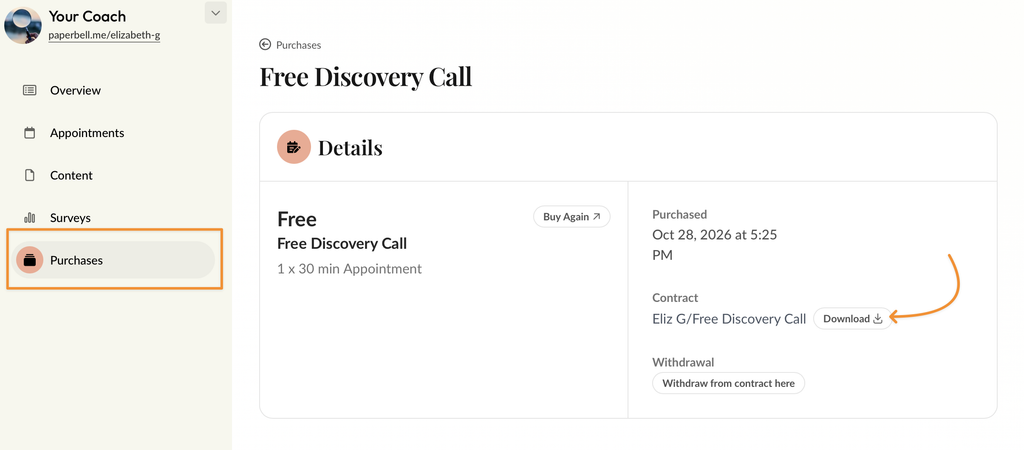
Your client can find their contract by logging in at the Client Portal, https://PaperbellClient.com/, and clicking on Purchases.
On the next screen, they’ll click Billing details for their package, and they can download a copy of that package’s contract.
Does the client sign a contract when I gift a package?
No. Contracts aren’t signed when you gift a package. If you want your client to sign a contract and not pay for the package, create a private free package with a contract for that client, or create a 100% off coupon code for them to use instead.