

You need to reschedule a client session. Maybe it’s a family emergency. Maybe you woke up sick. Maybe a scheduling conflict crept up out of nowhere.
Whatever the reason, the moment you realize it needs to happen, that familiar knot forms in your stomach. Will they be annoyed? Will they think you’re flaky? What do you even say?
Here’s the thing: how you handle the reschedule matters just as much as the session itself. A well-worded email can actually strengthen your client relationship instead of denting it.
In this guide, you’ll learn how to reschedule an appointment via email for 2026 with grace and professionalism, including:
- When coaches should reschedule client sessions
- How to reschedule an appointment via email (step by step)
- 8 scenario-specific reschedule email templates
- What to do after you send the reschedule email
- How to minimize the need to reschedule in the first place
- How to reschedule a coaching session using Paperbell
- Best practices for coaches when rescheduling
When Should Coaches Reschedule Client Sessions?
Not every situation warrants rescheduling. But certain circumstances absolutely justify changing the appointment.
1. Illness or family emergencies
When you’re sick enough that you can’t show up fully for your client, rescheduling is the right call.
Your clients deserve your full presence and energy. The same goes for family emergencies that require your immediate attention.
2. Scheduling conflicts
Sometimes conflicts arise that you didn’t anticipate.
Maybe a last-minute opportunity comes up that’s critical for your business, or another client has an urgent situation that creates a scheduling collision.
3. Client requests
Often, your clients will initiate the reschedule themselves. They might have:
- Work conflicts
- Childcare issues
- The need for more time before your next session
It makes sense to honor these requests in most cases.
4. Last-minute situations
You may encounter curveballs such as:
- Transportation problems
- Tech failures
- Unexpected meetings
These can make it impossible to honor the original appointment time.
Balancing business needs with client relationships
The decision to reschedule should always consider the impact on your client relationship. Frequent rescheduling can erode trust and rapport, and make clients feel like they’re not a priority.
Reserve rescheduling for situations that truly warrant it. When you do need to make a change, handle it with extra care.
Pro tip: Want to prevent scheduling conflicts before they happen? Try Paperbell for free to manage your coaching calendar with smart availability controls, buffer times between sessions, and automated reminders that reduce no-shows.
How to Reschedule an Appointment via Email
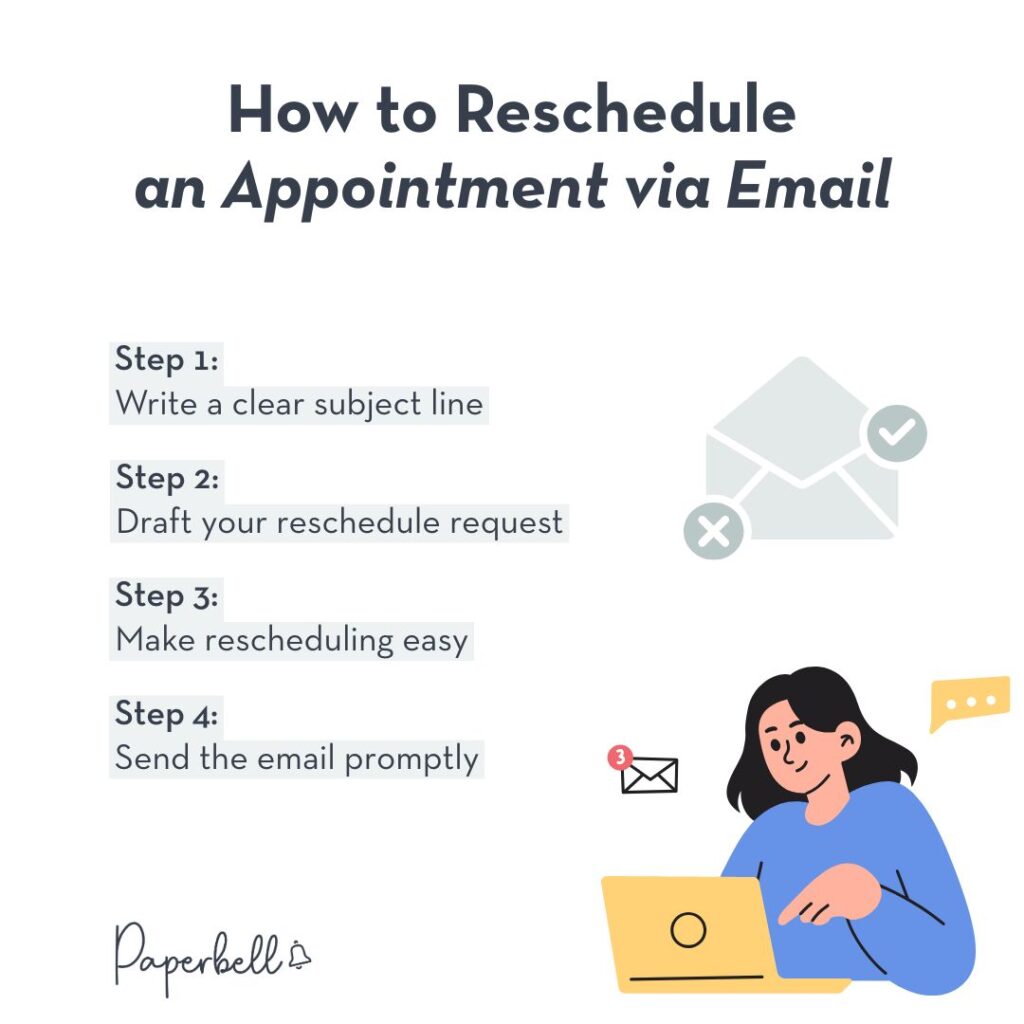
Whether you use Gmail, Outlook, or another email platform, the process for rescheduling via email follows these essential steps.
Step 1: Write a clear subject line
Your subject line should immediately communicate what the email is about. Skip vague phrases like “Quick question” or “Schedule update” and be specific.
Try these instead:
- “Rescheduling our session on Tuesday, March 15”
- “Need to move our coaching call scheduled for 2pm tomorrow”
- “Requesting to reschedule our March 20th appointment”
Step 2: Draft your reschedule request
Start your email by acknowledging the inconvenience and providing a concise reason for the change.
But most importantly, give options for alternative timelines. You should never bring up a problem without potential solutions.
Step 3: Make rescheduling easy
If you use scheduling software, include a direct link where clients can view your availability and book a new time themselves.
This puts them in control and speeds up the process.
Step 4: Send the email promptly
As soon as you know you need to reschedule, send the email.
The more notice you provide, the easier it is for your client to adjust their own schedule.
8 Reschedule Appointment Email Templates for Coaches (2026)
Having ready-to-use templates makes it simpler (and faster) to notify clients when circumstances change. Here are 8 professional reschedule appointment email samples you can adapt for your coaching business, organized by scenario.
General Reschedule Template
Subject: Need to reschedule our upcoming appointment on [Date]
Hi [Client Name],
I need to reschedule our coaching session originally scheduled for [Day], [Date] at [Time]. [Brief one-sentence reason].
I have the following times available this week:
- [Option 1: Day, Date, Time]
- [Option 2: Day, Date, Time]
- [Option 3: Day, Date, Time]
You can also view my full availability and book directly here: [Your Paperbell scheduling link]
I apologize for any inconvenience this causes and truly appreciate your flexibility.
Looking forward to connecting soon!
[Your Name]
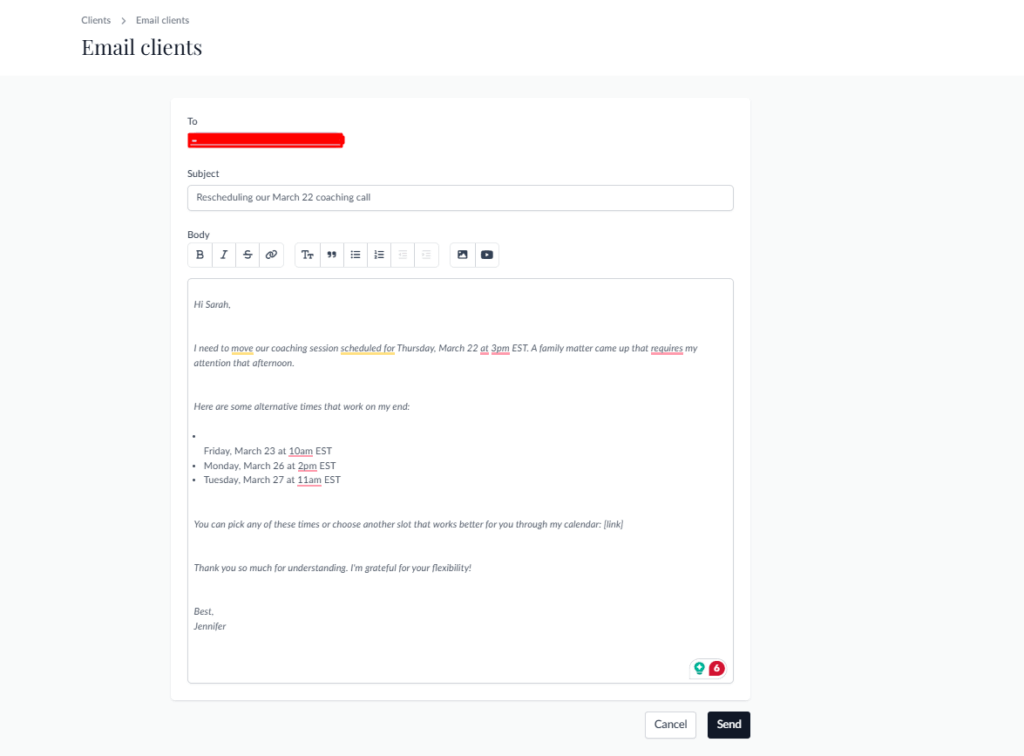
Family Emergency Reschedule Template
Subject: Rescheduling our March 22 coaching call
Hi Sarah,
I need to move our coaching session scheduled for Thursday, March 22 at 3pm EST. A family matter came up that requires my attention that afternoon.
Here are some alternative times that work on my end:
- Friday, March 23 at 10am EST
- Monday, March 26 at 2pm EST
- Tuesday, March 27 at 11am EST
You can pick any of these times or choose another slot that works better for you through my calendar: [link]
Thank you so much for understanding. I’m grateful for your flexibility!
Best,
Jennifer
Illness/Health Reason Reschedule Template
Subject: Need to reschedule tomorrow’s 2pm session
Hi Marcus,
I’m writing to reschedule our session tomorrow (Wednesday) at 2pm. I’ve come down with a cold and want to make sure I can fully show up for our work together.
Would either of these times work for you instead?
- Friday at 2pm EST
- Monday at 10am EST
If neither works, please let me know what days/times suit your schedule this week or next, and I’ll do my best to accommodate.
I really appreciate your understanding!
Talk soon,
Devon
Business Meeting Conflict Template
Subject: Moving our strategy session to next week
Hi Alex,
I need to move our strategy session from this Thursday at 1pm to next week. An unexpected client emergency requires my immediate attention.
I have availability next week at:
- Tuesday at 1pm EST
- Wednesday at 3pm EST
- Thursday at 10am EST
Please let me know which time works best, or feel free to book directly: [scheduling link]
Thanks for being so understanding!
[Your Name]
Scheduling Conflict Reschedule Template
Subject: Rescheduling our next coaching session
Hi Jordan,
I hope you’re doing well! I need to reschedule our upcoming session on April 5th at 4pm. I have a scheduling conflict that just came up.
Here are a few options for our next session:
- April 8th at 2pm EST
- April 9th at 11am EST
- April 10th at 3pm EST
You can also check my calendar for other available times: [link]
I’m sorry for the change and appreciate your flexibility. Looking forward to our next conversation!
Warmly,
Taylor
Short Notice Reschedule Message
Subject: Quick schedule change for our Monday session
Hi Riley,
Just a heads up that I need to reschedule our Monday session at noon. I have a work conflict that afternoon.
Are you available at any of these times instead?
- Monday at 3pm EST
- Tuesday at 10am EST
- Wednesday at 2pm EST
Let me know what works, or grab a time from my calendar: [scheduling link]
Thanks so much for rolling with this change!
Best,
Sam
Last-Minute Emergency Reschedule Template
Subject: Last-minute reschedule needed for today’s 3pm session
Hi Casey,
I’m so sorry for the extremely short notice, but I need to reschedule our session today at 3pm. I’m dealing with an unexpected personal emergency.
I completely understand if none of these work given the last-minute change, but I have availability:
- Tomorrow at 3pm EST
- Friday at 1pm EST
- Monday at 11am EST
You can also check my full calendar here: [link]
I sincerely apologize for the disruption and really appreciate your understanding during this time.
Thank you,
Morgan
Goodwill Gesture Template (for Very Short Notice)
When you have to reschedule with very little notice, a small goodwill gesture can go a long way toward keeping the relationship strong. This is especially true for high-ticket clients or if this is the second reschedule in a short window.
Subject: So sorry — need to reschedule today’s session
Hi [Client Name],
I am truly sorry for reaching out on such short notice, but I need to reschedule our session today at [Time] due to [brief reason].
I know this is disruptive and I don’t take that lightly. To make it right, I’d love to add an extra 15 minutes to our next session at no extra charge — just my way of saying thank you for your patience.
Here are a few options for rescheduling:
- [Option 1: Day, Date, Time]
- [Option 2: Day, Date, Time]
- [Option 3: Day, Date, Time]
Or grab a time directly from my calendar: [link]
Again, I really appreciate your understanding.
Warmly,
[Your Name]
Reschedule Appointment Text Message Sample
While email is typically the most professional channel for rescheduling requests, sometimes a text message is appropriate, especially if you have that kind of relationship with your client.
Hi [Name]! I need to reschedule our session on [Day] at [Time]. [Brief reason]. Are you free [Alternative Time 1] or [Alternative Time 2] instead? You can also book here: [link]. Thanks for understanding!
What to Do After You Send the Reschedule Email
Hitting send is not the finish line. What happens next matters just as much as the message itself.
Follow up if you don’t hear back
If your client hasn’t responded within 24 hours, a brief check-in is completely appropriate. Keep it light:
“Hi [Name], just wanted to make sure my reschedule email came through! Happy to find a time that works for you — here’s my calendar: [link].”
Don’t chase repeatedly, but one follow-up shows you’re on top of it and haven’t forgotten them.
Confirm the new appointment
Once your client selects a new time, send a short confirmation. This prevents any “I thought it was Thursday, not Friday” confusion and starts the rescheduled session on solid footing.
If you’re using Paperbell, this happens automatically. The system sends both of you a confirmation that shows the original time AND the new time, so there’s no room for mix-ups.
When the client is upset
Most clients will be gracious. But occasionally, a last-minute reschedule will frustrate someone, especially if it’s happened more than once.
If a client responds with frustration, stay calm and don’t get defensive. Acknowledge their feelings directly:
“I completely understand this is frustrating, and I’m sorry for the disruption. I want to make sure we find a time that works well for both of us.”
Then offer a concrete solution — a specific time, a scheduling link, or even a small gesture like the extra session time in the goodwill template above. Staying professional during a tense moment is one of the things that separates coaches who keep clients for years from those who cycle through them.
When to consider a refund
If you’ve rescheduled multiple times in a short period and a client is genuinely disrupted, it may be worth offering a partial refund or a free session. This is a judgment call based on your relationship with the client, your cancellation policy, and how much notice you gave.
Having a clear cancellation and rescheduling policy in your coaching contract avoids any ambiguity. Paperbell lets you set minimum notice requirements on each coaching package, which makes your policies easy to communicate and enforce from the start.
How to Minimize the Need to Reschedule
The best reschedule email is the one you never have to send.
That sounds obvious, but plenty of coaches treat rescheduling as inevitable when a lot of it is actually preventable. Here’s what helps.
Build buffer time into your calendar
Back-to-back sessions are a recipe for running late, and running late can cascade into having to reschedule entirely. Build 15 to 30 minutes between every session so you have room to breathe, finish notes, and handle anything unexpected.
Paperbell lets you set universal appointment gaps which means they’re built in automatically rather than something you have to remember manually.
Send confirmation reminders
A lot of rescheduling happens because of no-shows and confusion about times, not because of genuine emergencies. Automated email reminders sent 24 to 48 hours before each session keep both you and your client on track.
According to a review published in the Journal of Medical Internet Research, appointment reminder systems significantly reduce no-show rates across service-based businesses. Fewer no-shows means fewer scrambled rescheduling conversations.
Set a clear cancellation and rescheduling policy
When clients know your policy upfront, they’re more likely to respect your time and plan ahead rather than canceling at the last minute. Include your policy in your coaching contract and make it easy to find in your client portal.
A reasonable policy might look like: 24 to 48 hours notice required to reschedule; anything less is counted as a session. The specifics are up to you, but having something in writing protects both parties.
Give clients the power to self-reschedule
When clients can reschedule themselves easily, they often do it further in advance because it’s not a big deal. If they have to send an email and wait for you to respond, they might put it off and end up canceling with less notice.
Through their client portal in Paperbell, clients can reschedule directly within your available windows. No back-and-forth needed.
Watch for patterns
If a particular client reschedules frequently, that’s worth a conversation. It might signal they’re struggling to commit, that the session time doesn’t work well for them long-term, or that there’s a deeper issue with the coaching relationship worth addressing. Noticing the pattern early gives you a chance to course-correct before it becomes a problem.
How to Reschedule a Coaching Session Using Paperbell
Rescheduling doesn’t have to be complicated or time-consuming. Paperbell makes it possible to easily reschedule appointments both for you and your clients.
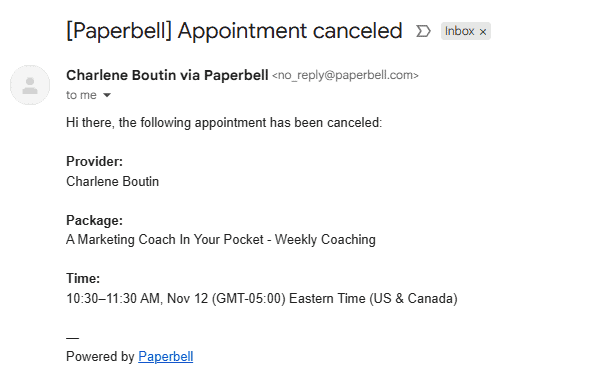
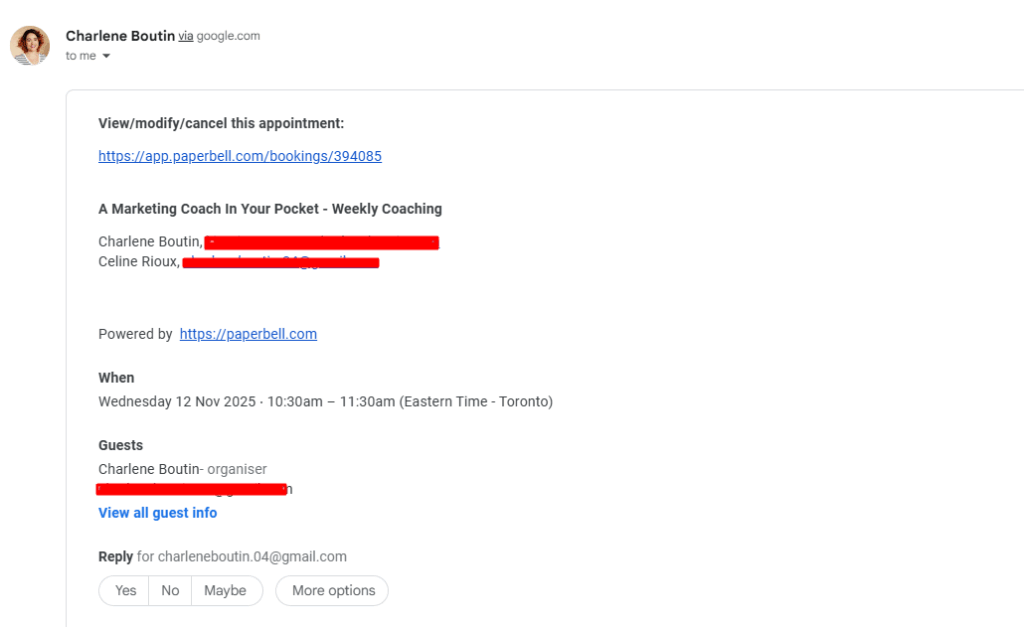
When you or your client reschedules a session through Paperbell, the automated email now shows both the old date and time and the new date and time. No more confusion or detective work required!
Here’s what your clients will see:
This works for:
- Client-initiated reschedules through their portal
- Any changes you make to appointments on your end
- Both individual and group sessions
For clients to reschedule themselves:
Your clients will see rescheduling links in the email and calendar appointment they receive from Paperbell.
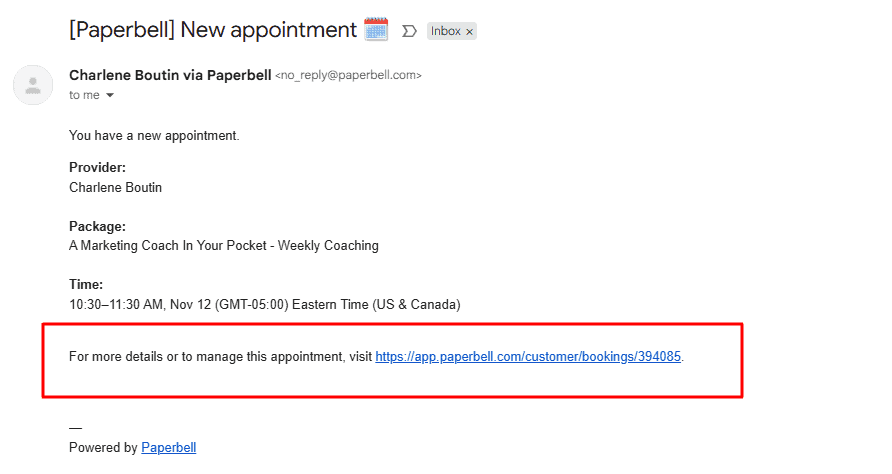
They can also go to their client portal on Paperbell to modify or cancel their appointments.
Your minimum notice scheduling setting determines how far in advance they can book or cancel. This is a universal setting that gives you complete control over your rescheduling policies.
Rescheduling on behalf of a client:
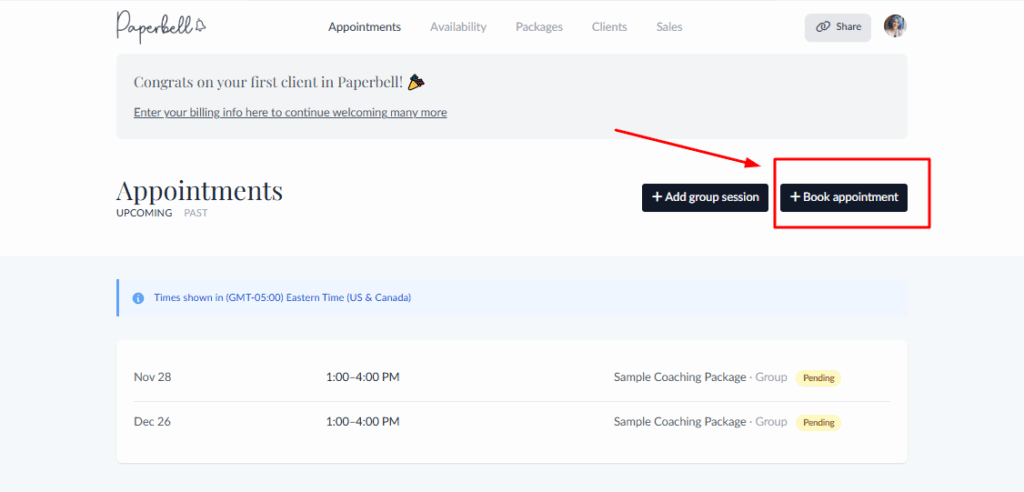
If you need to book or reschedule for your client, it’s easy to do in Paperbell. Select the appointment from the Appointments page, then edit the details and choose a new appointment time from the date selector. The system will automatically send the updated notification with both the old and new times clearly displayed.
This automatic clarity:
- Reduces client confusion
- Prevents missed appointments
- Saves you from having to manually explain what changed
It’s one less thing to worry about when you’re already dealing with the stress of needing to reschedule.
Best Practices for Coaches When Rescheduling
Beyond having the right email template, following these practices will help you maintain professionalism and preserve client relationships when schedule changes happen.
1. Give as much notice as possible.
The moment you know you need to reschedule, reach out to your client. Even an extra few hours of notice makes a difference in helping them adjust their own schedule.
Waiting until the last minute creates unnecessary stress for everyone.
2. Be honest, but don’t over-explain.
Your clients deserve to know why you’re rescheduling, but they don’t need your entire life story. A brief, honest explanation shows respect without turning the situation into something bigger than it needs to be.
For example, “I have a family matter that requires my attention” is sufficient. You don’t need to detail every aspect of the emergency.
3. Offer flexible options.
When proposing new times, offer variety. Include options across different days and times of day if possible.
This increases the likelihood that at least one option will work for your client’s schedule.
Even better, share your scheduling link so clients can see all your available times and pick what works best for them.
4. Follow up with confirmation.
Once your client selects a new time, send a quick confirmation. This ensures you’re both on the same page and prevents any confusion about the rescheduled appointment.
With Paperbell, this happens automatically. When a new time is booked, both you and your client receive confirmation with all the updated details.
5. Use scheduling tools to prevent future conflicts
The best way to handle rescheduling is to minimize how often it needs to happen in the first place. Use tools that help you manage your availability thoughtfully.
How Paperbell helps maintain professionalism automatically
Paperbell takes care of the details that make rescheduling smooth and professional:
- Buffer times between sessions prevent back-to-back appointments from running into each other
- Automated reminders reduce no-shows that might otherwise create scheduling chaos
- Customizable availability settings let you control exactly when clients can book
Plus, with everything in one platform including your payment emails and client communications, you maintain a consistent, professional experience even when changes happen.
Rescheduling Happens: Handle It with Grace
Schedule changes are an inevitable part of running a coaching business. What sets professional coaches apart isn’t avoiding rescheduling altogether but handling it with clarity, empathy, and efficiency.
And when you use Paperbell to manage your coaching appointments, the entire rescheduling process becomes smoother for everyone involved. Try Paperbell for free and experience how simple appointment management can be when everything works together in one platform.
FAQ About Rescheduling Appointments via Email
How do I write an email to reschedule an appointment?
Start with a clear subject line, briefly apologize and explain why you need to reschedule. Offer two to three specific alternative times, and thank your client for their flexibility.
How do I politely reschedule an appointment?
Notify your client as soon as possible, acknowledge the inconvenience, keep your explanation brief. Be sure to offer convenient alternative time slots, and express genuine appreciation for their understanding.
Can I reschedule via email?
Yes, email is a professional and appropriate way to reschedule appointments. It provides a written record and gives your client time to check their calendar before responding. But an online scheduling tool like Paperbell makes it easier for all parties involved.
How do you politely ask to reschedule a coaching session?
Use a direct subject line, briefly explain your situation, and propose alternative times that work for your schedule. Make it easy for your client to respond, and thank them sincerely.
Is there a tool that can easily manage rescheduling for coaches?
Paperbell makes rescheduling simple for coaches with automated email notifications that show old and new times, client self-service rescheduling through their portal, and customizable scheduling controls.
What should I do if a client doesn’t respond to my rescheduling email?
Wait 24 hours, then send a brief, friendly follow-up. Keep it short and include your scheduling link so they can book easily. If you still don’t hear back after a second attempt, a quick text or phone call is appropriate.
How much notice should I give when rescheduling?
As much as possible. The general rule of thumb is at least 24 to 48 hours. For same-day rescheduling, reach out the moment you know and be especially gracious in your message. Your cancellation policy should outline your minimum notice requirements so expectations are set from the start.