
Want to share TikTok to your Facebook Story? Cross-posting is one of the easiest ways to squeeze more reach out of every video you make — no recreating content from scratch.
The good news? There are 4 ways to do it — some take 10 seconds, some give you more control. Here’s what we’ll cover:
- How to Link TikTok to Facebook
- 4 Ways to Share TikTok to Facebook Story
- How to Share TikTok to Facebook Reels
- How to Share TikTok to Your Facebook Feed
- Why Can’t I Share TikTok to Facebook Story? (Troubleshooting)
- How to Share a Video From Facebook to TikTok
- FAQs About Cross-Platform Sharing
How to Link TikTok to Facebook
Sharing your TikTok videos on Facebook Stories is a great strategy to land more coaching clients. But first, you need to link your TikTok account with your Facebook profile — this is what makes direct sharing work.
With just a few steps, you can connect the two and start sharing right away.
Here’s how:
- Open the TikTok app and log in.
- Navigate to the Profile tab and tap on the “Me” icon.
- Access Settings and Privacy (tap on the three vertical dots).
- Select ‘Share settings.’
- Tap ‘Facebook’ (If not yet logged in, log in on Facebook and tap “Continue.”)
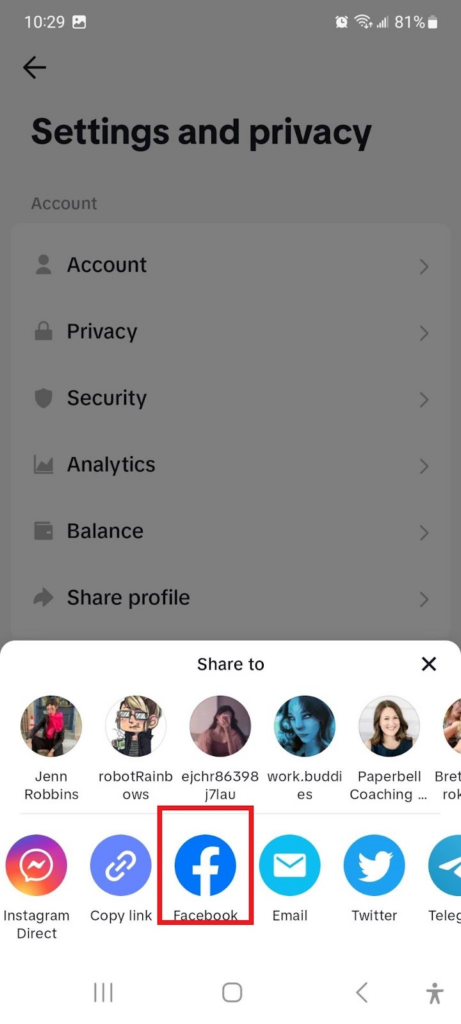
- Grant Permissions, then click “Continue.”
Congratulations! Your TikTok account is now linked to your Facebook profile.
Now that they’re connected, let’s look at the different ways to share.
[Read: How To Increase Social Media Engagement for Coaches in 7 Easy Steps]
4 Ways to Share TikTok to Facebook Story
Sharing TikToks on Facebook puts your content in front of a different audience — people who may never find you on TikTok at all. For coaches, that’s more chances to show your expertise and personality to potential clients without any extra recording.
Here are 4 ways to do it:
1. Share Directly From TikTok
The fastest option — no saving, no switching apps.
- Open the TikTok app and log in.
- Select the video you want to share.
- Tap the “Share” icon.
- Select “Share to Facebook Story.” (If you don’t see it, tap “More” and look for Facebook.)
- Add any text or stickers if you want.
- Tap “Share” to post.
2. Save and Upload Manually
If you want more control over how the video looks in your Story, save it first and upload it directly through Facebook.
- Open TikTok and select the video.
- Tap “Share” → “Save Video.” It’ll save to your camera roll.
- Open the Facebook app and tap “Add to Story.”
- Select the saved video from your camera roll.
- Add any text or stickers.
- Tap “Share.”
3. Copy and Paste the Link
This works well if the direct share option isn’t showing up for you.
- Tap “Share” on the TikTok video.
- Select “Copy Link.”
- Open Facebook and create a new Story.
- Paste the link into your Story’s text box — Facebook will automatically generate an embedded preview of the video.
4. Schedule With Third-Party Tools
If you’re batching content and want to plan ahead, tools like Buffer or Later let you schedule posts across both TikTok and Facebook at the same time.
This is a great option for coaches who create content in batches and want to stay consistent without logging in every day.
[Read: How to Get Coaching Clients Without Social Media]
How to Share TikTok to Facebook Reels
Facebook Reels reach people outside your existing followers — which means more discovery potential for coaches who want to grow. And if you’re already making TikToks, the content is already done.
Here’s how to post a TikTok to Facebook Reels:
- Save your TikTok video. In the TikTok app, tap “Share” → “Save Video.” This saves the video to your camera roll — with the TikTok watermark on it.
- Remove the watermark (optional but recommended). Facebook’s algorithm can deprioritize watermarked videos. Tools like SnapTik or SSSTik let you download your TikTok without the watermark for free — just paste the video link.
- Open Facebook and tap “Reels.” On your home feed, tap “Reels” → “Create Reel,” or tap the “+” icon and select “Reel.”
- Upload the saved video. Select it from your camera roll.
- Add a caption and hashtags. Keep your caption short and punchy. Hashtags like #coachinglife, #lifecoach, or #mindsetcoach can help with discovery.
- Tap “Share.”
One video, two platforms.
How to Share TikTok to Your Facebook Feed
Want your TikTok to show up in people’s Facebook feeds — not just Stories or Reels? You’ve got two options.
Option 1: Share the link. Copy your TikTok link and paste it into a Facebook status update. Facebook will embed a preview of the video automatically, and people can click through to watch it on TikTok. Quick and easy, but it sends traffic OFF Facebook — which the algorithm doesn’t love.
Option 2: Upload the video natively. Save your TikTok (remove the watermark if you want), then create a new Facebook post and upload the video file directly. Native videos get far better organic reach than link posts. If you want engagement, go with this one.
Either way, add a caption, tag coaching-related topics, and point people to your booking link in the comments.
Why Can’t I Share TikTok to Facebook Story? (Troubleshooting)
If the “Share to Facebook Story” option isn’t showing up — or you’re getting an error — here are the most common reasons and how to fix them.
Your accounts aren’t linked
The direct share option only works if your TikTok and Facebook accounts are connected. Head back to the “How to Link TikTok to Facebook” section above and follow those steps. Once they’re linked, the option should appear.
Your TikTok app needs an update
An outdated app can break sharing features. Open your app store, check for a TikTok update, and try again after installing it.
The video is set to Private
Private TikTok videos can’t be shared to other platforms. Go to the video’s privacy settings and switch it to “Public” or “Friends” before sharing.
Facebook Story sharing is temporarily unavailable
Sometimes Facebook or TikTok pushes an update that temporarily breaks direct sharing. If everything looks right on your end but it still won’t work, save the video and upload it to your Facebook Story manually. It usually sorts itself out within a day or two.
The Other Way Around: How to Share a Video From Facebook to TikTok
Want to go the other direction? You can share a Facebook video to TikTok by saving it to your device (tap “Share” → “Save Video” on the Facebook post), then opening TikTok, tapping “+”, and uploading the saved file from your gallery. Add a caption and hashtags — things like #lifecoachtips or #coachinginsights work well — and hit “Post.”
Just make sure you’re following both platforms’ guidelines around copyright and content ownership before repurposing anything.
FAQs About Sharing TikTok to Facebook
Why should I share my TikTok videos on Facebook Stories?
Facebook has over 3 billion monthly active users — a big chunk of whom aren’t on TikTok. Cross-posting gets your content in front of them without any extra work.
Will my video quality be affected when shared on Facebook?
Not significantly. Video quality should stay close to the original. Just make sure both platforms support the format and resolution of your video before sharing.
Can I add captions or links to my shared videos in Facebook Stories?
Yes. When you share a video to your Facebook Story, you can add text overlays, stickers, or links. Good spot to drop your booking link.
Does sharing TikTok to Facebook remove the watermark?
No — when you save a TikTok video using the in-app “Save Video” option, the TikTok watermark stays on. If you want a clean version, use a free tool like SnapTik or SSSTik to download the video without the watermark before posting to Facebook.
Can I share TikTok to Facebook Reels?
Yes! Save your TikTok video (remove the watermark if you want), then upload it directly when creating a Reel in Facebook. See the full walkthrough in the How to Share TikTok to Facebook Reels section above.
Why can’t I share my TikTok to Facebook Story?
The most common culprits are unlinked accounts, an outdated TikTok app, or a video set to Private. Check the troubleshooting section above for a full breakdown and fixes.
If someone shares my video without permission, what can I do?
You can report the post for copyright infringement on Facebook. For more details, visit Facebook’s Help Center.
Be a Successful Coach by Boosting Your Social Media Presence
Cross-posting TikToks to Facebook Stories, Reels, and your feed is about as close to free reach as you’ll get. Link your accounts, pick the method that fits how you work, and the same video does twice the job.
When those new followers turn into potential clients, make sure you’re ready. Try Paperbell for free and run your whole coaching business from one place — scheduling, payments, contracts, and more.
This post was originally published in June 2023 and has been updated with new information for accuracy and comprehensiveness.