

Right now your coaching business probably lives in five places at once.
A scheduling link. A payment processor. A contract in a Google Doc. An email thread where a client is asking (again) how many sessions they have left.
Coaching software is supposed to collapse all of that into one place. The catch is that “coaching software” now describes dozens of products, three of which shut down in the last two years, and most roundups won’t tell you what any of them cost.
So here’s a straight comparison of seven platforms built for coaches: current prices, one real strength and one real weakness each, and a verdict on who each one suits.
What is coaching software?
Coaching software is the business layer of your practice: booking, payments, packages, contracts, intake forms, and the client-facing portal where all of that lives.
It’s not your coaching method. Wheel of Life exercises, session frameworks, and worksheets are a separate category, covered in our free coaching toolkit.
It’s also broader than a customer relationship management (CRM) tool. A CRM tracks contacts and notes. An all-in-one platform does that and takes money, signs the contract, and books the call. If contact tracking is the specific thing you’re after, our client management software review compares tools from that angle.
This post is about the end-to-end platforms you could run a whole practice on.
What is the best coaching software?
There isn’t one answer, because these tools are built for very different sizes of practice. A solo coach with eight clients and a coaching company with 300 program participants should not end up on the same platform. Here’s the short version before we share more details.
Prices verified September 2026. Check each vendor’s site for current rates.
| Platform | Starting price | Free option? | Best for |
|---|---|---|---|
| Paperbell | $57/mo, or $570/yr | No free-forever plan | Solo coaches who want one flat price and no client limits |
| CoachAccountable | $20/mo (2 clients) | 30-day free trial | Coaches with a tiny roster who want to pay almost nothing |
| Satori | See vendor pricing page | 15-day free trial | Coaches with seasonal or occasional clients |
| Upcoach | $49/mo billed annually (25 participants) | 14-day free trial | Group programs and cohort-based coaching |
| Simply.Coach | $9/mo (3 clients) | 14-day free trial | The cheapest way to test a real platform |
| Delenta | $29/mo, or $229/yr | Free trial (see note below) | Coaches who want transparent annual pricing |
| Practice Better | Free (3 clients), then $35/mo | Yes, genuine free tier | Health and wellness coaches who need clinical-style records |
One thing to watch in that table: most of those starting prices are gated behind a client count, which is where the real cost difference shows up once you grow.
Which coaching platforms are worth comparing in 2026?
Seven made the cut. Each gets the price, the thing it does better than the rest, and the thing that would genuinely annoy you.
1. Paperbell

Full disclosure: this is our product, so weigh the weakness below carefully.
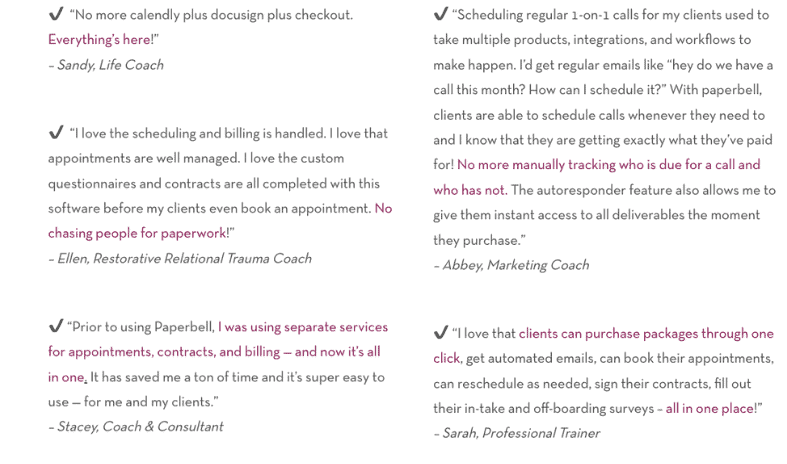
Paperbell is built to be the only business tool a coach needs. Scheduling, payments, coaching packages, contracts, intake forms, landing pages, and a client portal sit in one account, and a single link carries a new client through booking, signing, and paying. You connect your own Stripe or PayPal, so the money lands right in your account.
Price: $57 a month, or $570 a year. That’s the whole pricing page. No client-count tiers, no per-seat charges, no upgrade when you take on your ninth client.
Standout strength: the flat price with unlimited clients. Every other platform here charges more as your roster grows, so the tool you pick at five clients is a different price at fifty.
Honest weakness: there’s no free-forever plan. You can start for free, no credit card required, but running your practice on it long-term costs $57 a month. It also has no built-in video calling (you plug in your own meeting link) and it isn’t a website builder, so a content-heavy site still belongs on a proper coaching website platform.
Best for: solo and small-team coaches who’d rather pay one predictable price than juggle five subscriptions and watch client limits.
2. CoachAccountable
CoachAccountable takes the opposite approach to pricing. Instead of one plan, there are more than a dozen levels linked to how many clients you’re actively working with.
Price: Starter is $20 a month for 2 clients. Then $40 for 5, $70 for 10, $120 for 20, $250 for 50, $400 for 100, climbing to $4,000 a month at 1,000 clients. There’s a 30-day free trial, no credit card required. Current tiers are on the CoachAccountable pricing page.
Standout strength: at two or three clients, $20 a month is genuinely cheap for a platform this capable. Very few tools let a tiny practice pay tiny money.
Honest weakness: the cost curve is steep and the tier names get silly (Level 3, Level 3.5, Level 4, Level 4.5), so working out your annual spend takes real effort. Going from 10 clients to 20 nearly doubles the bill.
Best for: coaches with a deliberately small roster who want their software bill to start near zero.
3. Satori
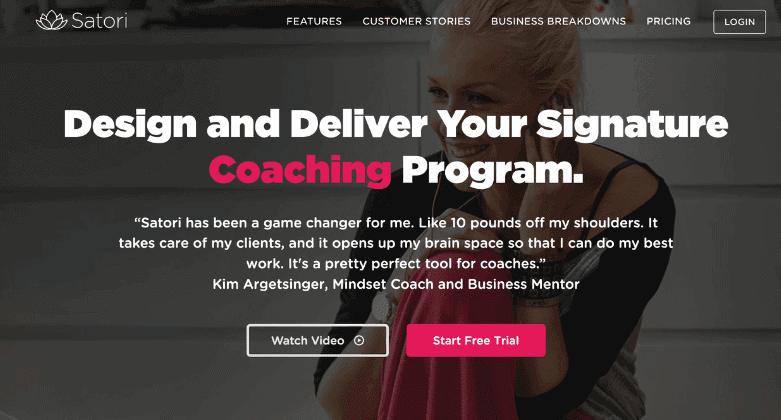
Satori has been around a long time in coaching-tool years, and it runs on a model none of the others use: you’re billed on active clients only, not everyone who has ever hired you.
Price: three tiers: Essentials at $33/month (for newer coaches with up to 10 active paying clients), Pro at $49/month, and Leader at $124/month. There’s a 15-day free trial with no credit card required, two months free if you pay annually, no setup or cancellation fees, and a 30-day refund window.
Standout strength: the active-clients-only billing. If your work comes in waves, or clients pause for months, you’re not paying for dormant records.
Honest weakness: the pricing climbs fast as your roster grows. Essentials caps you at 10 active paying clients, and the Leader tier runs $124 a month, more than double Paperbell’s flat $57 with no client cap.
Best for: coaches with seasonal or on-and-off clients, where a headcount plan would mean paying for people who aren’t currently active.
We’ve also written a direct Satori vs Paperbell comparison if those two are your shortlist.
4. Upcoach
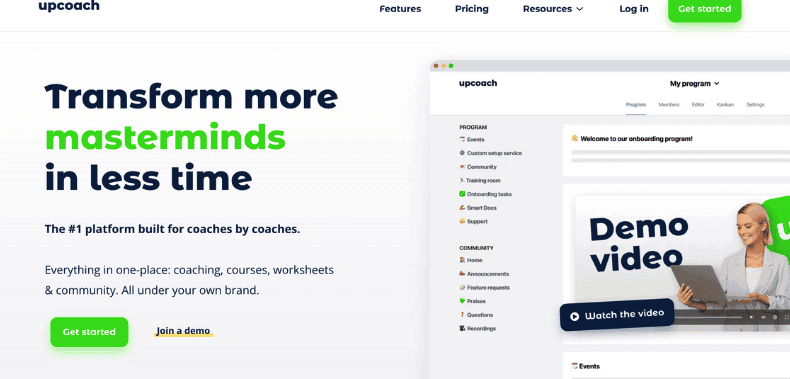
The giveaway with Upcoach is the word it uses for the people you coach: participants. Everything about the platform is shaped around programs, cohorts, and groups moving through something together.
Price: plans are quoted as monthly rates billed annually. Starter is $49 a month for 25 active participants and 1 seat, Pro is $99 for 100 participants and 2 seats, Business+ is $199 for 250 participants and 5 seats, Scale is $399 for 500 participants and 10 seats. Enterprise is custom. There’s a 14-day free trial with no credit card required, plus a 30-day money-back guarantee after your first charge. See the Upcoach pricing page.
Standout strength: group and cohort delivery is a first-class feature, not something bolted onto a one-to-one tool. The seat structure also lets a small team share one account properly.
Honest weakness: for a solo coach doing one-to-one work, this is overkill and overpriced. You’re paying for participant capacity and seats you’ll never touch, and the monthly (non-annual) rate isn’t published, so the sticker price assumes a year’s commitment.
Best for: group programs, cohort-based coaching, and coaching businesses with more than one coach.
5. Simply.Coach
Simply.Coach has the lowest entry price of any dedicated coaching platform we checked, which makes it a cheap way to find out whether you even like working inside a platform.
Price: on the solo plans, Starter is $9 a month for 3 clients, Essentials is $29 for 7, Growth is $49 for 30, and Leap is $69 for unlimited clients. There’s a 14-day free trial, no credit card required, and Growth and Leap include onboarding help. Annual plans are advertised as saving up to 52%, but the figures aren’t published, so see the Simply.Coach pricing page.
Standout strength: $9 a month is close to a rounding error, and your clients get portal access at no extra charge.
Honest weakness: three clients is a cap you’ll hit fast, and the jump to the next tier more than triples your bill. Annual pricing staying invisible until checkout is another irritation.
Best for: coaches who want to test-drive a proper platform for the price of a coffee.
6. Delenta
Delenta covers the familiar all-in-one ground (booking, packages, payments, client records) and prices it in a way you can plan around.
Price: Starter is $29 a month or $229 a year. Pro is $49 a month or $469 a year. Premium is $79 a month or $699 a year. Team and Enterprise are quote-only. The current table is on the Delenta pricing page.
Standout strength: every named tier shows both a monthly and an annual figure right on the page. That sounds like a low bar until you try to find the same information on three of the other tools here.
Honest weakness: the pricing page contradicts itself on the free trial, saying 14 days in one place and 7 days of full access in another. It’s a small but sloppy detail on the page that’s asking for your card.
Best for: coaches who want to know exactly what a year costs before handing over a card.
7. Practice Better
Practice Better is the outlier here, and it’s included for one specific type of coach.
It’s built for health and wellness professionals broadly: nutritionists, dietitians, functional medicine practitioners, therapists, and trainers, with health and wellness coaches as one segment among many. The feature set follows, with clinical-style intake, care plans, and client records closer to an electronic health record than a coaching dashboard.
Price: Sprout is free for up to 3 clients. Starter is $35 a month, or $25 billed annually, for up to 10 clients. Professional is $69, or $59 annually, for up to 300. Plus is $99, or $89 annually, for unlimited clients. Team is $155, or $145 annually, with extra practitioners at $50 each. See the Practice Better pricing page.
Standout strength: the only genuine free-forever tier here, and the deepest client record on this list. If your work involves tracking protocols and progress in detail, nothing else comes close.
Honest weakness: the vocabulary and the depth are wrong for a general life or business coach. You’ll spend week one switching off clinical features you’ll never use, and the language assumes a licensed practitioner.
Best for: health, nutrition, and wellness coaches who want clinical-grade intake and progress tracking, or anyone who genuinely needs to start at $0.
Why did three coaching platforms shut down, and what does that mean for you?
Three platforms that appeared on plenty of “best coaching software” lists no longer exist. We rechecked all three domains in September 2026:
- Practice.do shut down permanently on 3 November 2025 after a failed acquisition. Client portals, scheduling links, and contracts went with it, and its domain now returns a 404. We wrote a full guide for coaches who still need to move their data.
- Profi wound down as part of an acquisition, with coach access ending on 31 December 2025. Its domain no longer resolves at all.
- Nudge Coach ceased operations and its domain now redirects to a parked lander with no product behind it.
Profi used to be one of our own recommendations on this page, which is exactly why it’s worth flagging. A tool being good is not the same as a tool still being there in eighteen months.
So: check that you can get your data out before you put it in. Client list, session notes, contracts, payment history. If export is hard or undocumented, that’s a risk, not a quirk.
And weigh stability alongside features. A tool that’s been running for years on its own revenue is a safer home for your client records than a newer one running on someone else’s money. That doesn’t mean never pick the newcomer. It means keep your own copy of anything you’d hate to lose.
What features does a coaching business actually need?
Feature lists here are long, overlapping, and not much help in a decision. These are the five that genuinely change your week.
Booking that handles time zones. If you coach across countries, this removes more emails than any other single feature.
Payments attached to packages, not invoices. Selling a six-session package should mean one checkout, then automatic charges if it’s a payment plan. Sending six invoices by hand is where coaches lose hours and money.
Contracts inside the booking flow. A signature step before the first session, without a separate e-signature subscription. Our guide to writing a coaching contract covers what belongs in it.
A client portal. One place where a client sees remaining sessions, past purchases, signed documents, and shared files. This is what stops the “how many calls do I have left?” emails.
Intake forms that send themselves. Before a first session, after a package ends, on a schedule you set once.
Everything else (habit tracking, course hosting, community feeds, marketing automation) is a nice-to-have some coaches use constantly and most never open. Don’t pay for it until you’ve missed it.
Just starting out and want the budget-first version of this decision? We’ve written a separate guide to the best coaching software for new coaches.
What’s the best software for executive coaches?
Executive and corporate coaching has different plumbing. When your client is a company rather than an individual, you’re usually navigating an engagement that covers several people at once, a sponsor (an HR lead, or your client’s manager) who wants progress visibility without seeing session content, and a procurement process that asks about data handling before anyone signs.
Solo executive coach billing individuals or small businesses? Your needs match any other one-to-one coach: clean booking, a contract, a package, an invoice that gets paid. Paperbell is built for that shape of practice, and the flat $57 doesn’t change when you take on higher-value clients.
Running cohorts for a corporate client? Upcoach’s participant-and-seat model is the closest fit here. Billing by active participants and giving your team separate seats matches how a leadership program gets delivered, and there’s a custom Enterprise tier for larger rollouts.
Managing a large roster across engagements? CoachAccountable’s higher tiers scale to hundreds of clients, and its structured client records suit coaches documenting progress over a long engagement.
One honest caveat: none of these seven is an enterprise talent-management suite. If a corporate buyer wants consolidated multi-stakeholder reporting, single sign-on, and a security review, that’s a different product category, and it got thinner when Profi (one of the few mid-market options aimed at coaching companies) closed. Book a demo and ask about your specific reporting and compliance requirements rather than trusting a feature list.
How much does coaching software cost?
For a solo coach, platform pricing in 2026 breaks down roughly like this: $0 to $20 a month for a free tier or a plan capped at two or three clients, $29 to $69 for where most coaches actually end up, and $99 and up for multi-seat and team plans.
Compare that with building your own stack from separate tools, using each vendor’s cheapest workable paid plan:
- Scheduling: Calendly Standard at $10 a month per seat, or Acuity Scheduling Starter at $16 billed annually ($20 monthly)
- Website: Squarespace Basic at $19 a month billed annually ($25 monthly)
- Contracts: DocuSign eSignature Personal at $11 a month, covering 5 envelopes a month
- Forms: Typeform Basic at $25 a month billed yearly ($28 monthly)
That’s $65 a month in confirmed fixed costs before you add video calling, and you’re still copying client information between four dashboards by hand. Card processing fees sit on top of every route here, all-in-one platforms included, because you connect your own Stripe or PayPal either way.
So: an all-in-one platform is usually cheaper than a decent stack of separate tools, and always cheaper in admin time. The stack only wins if you specifically need one part of it to be best-in-class.
How do I choose the right coaching software?
Four questions, in this order.
1. How many clients will you have in twelve months? Not today. Almost every platform here prices by client count, so this number decides your real cost more than the sticker price does. If the answer is “no idea,” a flat-rate tool removes the question.
2. Is your work one-to-one, group, or both? This is where these tools diverge most. A one-to-one platform will make you fight it to run a twelve-week group program, and a cohort platform feels like a stadium built for two people.
3. What are you already paying for separately? Add up the scheduling, e-signature, forms, and payment tools on your card right now. That total is the number a platform has to beat, not $0.
4. Can you leave? Start the trial, add one fake client, then try to export everything. Do it in week one, not the week you decide to switch.
Then pick one and commit for a quarter. Six months spent comparing tools costs you more than a wrong pick ever will.
Frequently Asked Questions About Coaching Software
Is there free coaching software?
Practice Better’s Sprout plan is the only genuine free-forever tier among the dedicated platforms we checked, and it caps you at 3 clients. Everything else offers a free trial (14 to 30 days, depending on the vendor) rather than an ongoing free option.
You can also cobble together free tiers of separate tools, but the free versions of scheduling apps and website builders usually block the thing you need most: taking payment.
Do I need coaching software if I only have two or three clients?
Probably not for the admin savings alone. At that size, a calendar and a payment link genuinely work.
What you get earlier than you’d expect is the professional impression: a client books, signs, and pays in one flow instead of getting four separate emails from you. If you’re selling packages above a few hundred dollars, that does real work.
Can coaching software handle group programs?
Some can, and it’s the biggest single difference between these tools. Upcoach is built around groups and cohorts from the ground up. Most others handle group sessions and group packages well enough for a small program, but aren’t designed to move a large cohort through structured content together. If group work is more than a sideline, make it your first question on any demo.
What happens to my client data if a coaching platform shuts down?
It depends on the platform and how much notice you get. Nudge Coach gave users an export window of a few weeks in 2025. Practice.do deleted live client portals, scheduling links, and contracts when it closed later that year.
Assume nobody will rescue your records for you. Export your client list and session notes on a schedule you actually keep, and confirm the export works before you migrate onto anything.
Do I still need a website if I use a coaching platform?
Most coaching platforms give you landing pages for your packages, which is enough to sell from and take bookings. You’ll want a real site if content marketing is part of your plan. Our comparison of life coaching website builders walks through the options.
Is a coaching platform better than just using Calendly and Stripe?
Calendly and Stripe are excellent at their jobs, and if all you need is a booking link and a way to charge a card, that pairing is hard to beat on price.
Where it breaks down is everything in between: packages with a set number of sessions, payment plans, contracts signed before the first call, intake forms, and a portal that answers your clients’ questions so you don’t have to. That’s the gap an all-in-one platform fills, and it’s why the two-tool setup usually gets replaced around the tenth client.
Editor’s note: this post was originally published in April 2023 and has been fully rewritten and updated for 2026, including current pricing for every tool.
Ready to run your whole coaching practice from one place? Try Paperbell for free.